Format: 1A
WebAssess API documentation
NOTE: this is a draft, on-going attempt to document the API. If things are missing or don’t work as described here, please get in touch.
Overview
The API uses the REST syntax but the semantics, due to the requirements, are a bit different. The backend maintains state information on behalf of the client. This is a requirement: it’s needed in order to prevent cheating and to enforce the rules and logic of the tests. (E.g. to prevent movig backwards withing the test if that has been setup that way. Also, in general, the client should only be able to navigate between the questions according to the rules defined by the server.)
Endpoints
All endpoint urls below are relative to the API root url path, which is: /api/v1/ if they don’t start with a /. The ones that do are absolute ones. We have a development and a production deployment at https://staging.webassess.com and https://app.myinnergenius.com/ respectively.
Authentication
All requests should be authenticated with a valid token passed in the Authorization header, using the Token scheme. E.g.: Authorization: Token <token_from_the_api> . NOTE that the auth endpoints have an absolute path which means that they should be appended to the server URL directly (ignoring the API root url path).
Logging in [POST] /rest-auth/login/
- Attributes
- email (string)
- password (string)
- Response 200 (application/json)
- Attrubutes (object)
- key (string) - The access token for this user. (The token is long lived.)
- Attrubutes (object)
Information about the logged-in user [GET] /rest-auth/user/
- Response 200 (application/json)
- Attributes (object)
- id (number)
- email (string)
- first_name (string) - deprecated, use
firstNameinstead - last_name (string) - deprecated, use
lastNameinstead - fullName (string)
- firstName (string)
- lastName (string)
- permissions (array [string]) - the list of permissions this user has
- groups - group memberships of this user. (Do NOT use this for authorization/permission checks.)
- Attributes (object)
Start an assessment (using a specific specified test battery) [POST] batteries/{id}/assessments/
Create a new assessment based on the battery specified by the id. A user can only have one active assessment per test battery. If the user already
- Parameters
- id (number) - the id of the battery to base the assessment on.
- Response 201 If creating the assessment (or, with the terminology we use, launching the battery) was successful
- Attributes
- id (number) - id of the assessment created
- Attributes
- Response 4xx If creating the assessment faied. This can be due to a number of reasons, including:
- the retry wait period is not yet over for the current user and the specified batter. (A user can retake an assessment only after the specified wait time is over.)
- the user doesn’t have permission to launch the given battery. E.g. because they ran out of retries (the number of allowed retakes can be restricted for a test battery) or they don’t have access to the specified battery (e.g. because it belongs to a different company)
Fetch test elements [GET] assessments/{assessment_id}/next/
A TestBattery (and thus an Assesssment) consists of TestElements. At the moment there are two type of elements: pages and groups. A group is a group of related questions. This endpoint returns the next test elements to be displayed. Repeat calls may or may not return the same result. E.g. if an element is timed (e.g. in case of a timed group or because the including test has a time limit) and the time is up between two successive calls, then the response contents will be different even if the client didn’t make any calls that could have changed the state of the assessment (e.g. by submitting a response).
Parameters
- id (number, optional) - as a query parameter: the id of the next element to return. This is optional. If not provided, the backend will look it up. If provided, the backend will double check whether the requested id is valid and (given the current state of the assessment) can be requested. Using the id resuts in a cheaper operation and is required for navigating backwards/between elements already presented to the user.
Response 200 (application/json)
- Attributes (array)
- next (number, nullable) - the id of the next element (to be used as the
idquery parameter when fetching elements) - previous (number, nullable) - the id of the prevous element (to be used as the
idquery parameter when fetching elements) - allowNext (boolean, optional) - whether the client should allow the user to move to the next element. This will not be present for
grouptype as the rules for that one are more complicated and can only be infered from the content (group object). - allowPrev (boolean, optional) - whether the client should allow the user to move to the previous element This will not be present for
grouptype as the rules for that one are more complicated and can only be infered from the content (group object). - type (enum[string]) - type of this element. (Either
pageorgroup.)- Members:
- page
- group
- Members:
- content (Page|Group) - The actual test element object.
- next (number, nullable) - the id of the next element (to be used as the
- Body
Example response with one group and one question in it:
[
  {
    "content": {
      "id": 115,
      "name": "Making Calculations S1",
      "description": "",
      "questions": [
        {
          "id": 38,
          "label": "<p>29 + 9 =</p>",
          "description": "",
          "response": null,
          "ordering": 0,
          "choices": [
            "36",
            "37",
            "38",
            "39",
            "None of the above"
          ],
          "resourcetype": "MultipleChoiceQuestion"
        }
      ],
      "template": "<div class=\"container\">\r\n    <div class=\"row\">\r\n        <div v-if=\"description\" class=\"col-md-7\" v-html=\"description\">\r\n        </div>\r\n        <div v-if=\"description\" class=\"col-md-1 vertical-separator\">\r\n        </div>\r\n        <div :class=\"description ? ['col-md-4'] : 'col'\">\r\n            <div class=\"row\" v-for=\"question in questions\">\r\n                <div v-if=\"question.label\" class=\"col-12\" v-html=\"question.label\">\r\n                </div>\r\n                <div v-if=\"question.description\" class=\"col-12\">\r\n                    <p v-html=\"question.description\"></p>\r\n                </div>\r\n                <div class=\"col-12\">\r\n                    <fieldset>\r\n                        <div class=\"form-group\">\r\n                            <p v-if=\"question.variant1\">{{question.variant1}}</p>\r\n                            <p  v-if=\"question.variant2\">{{question.variant2}}</p>\r\n                            <div class=\"custom-control custom-radio mb-2\" v-for=\"(choice, index) in question.choices\">\r\n                                <input :id=\"'choice-' + question.id + '-' + index\" class=\"custom-control-input\" type=\"radio\" :name=\"'radio-group-' + question.id\" v-model=\"question.response\" :value=\"choice\">\r\n                                <label class=\"custom-control-label\" :for=\"'choice-' + question.id + '-' + index\" v-html=\"choice\"></label>\r\n                                <!--label class=\"custom-control-label\" :for=\"'choice-' + question.id + '-' + index\">{{ choice }}</label-->\r\n                            </div>\r\n                        </div>\r\n                    </fieldset>\r\n                </div>\r\n            </div>\r\n        </div>\r\n    </div>\r\n</div>",
      "timeLimit": null,
      "elapsed": "314.292279",
      "allowPrev": true,
      "allowNext": true,
      "allowSkip": true,
      "test": {
        "id": 2911,
        "name": "Trial for testing templates [all non-Sample ItemBanks]",
        "timeLimit": null,
        "elapsed": "314.292313"
      }
    },
    "next": 20521,
    "previous": null,
    "type": "group"
  }
]
A more complex example:
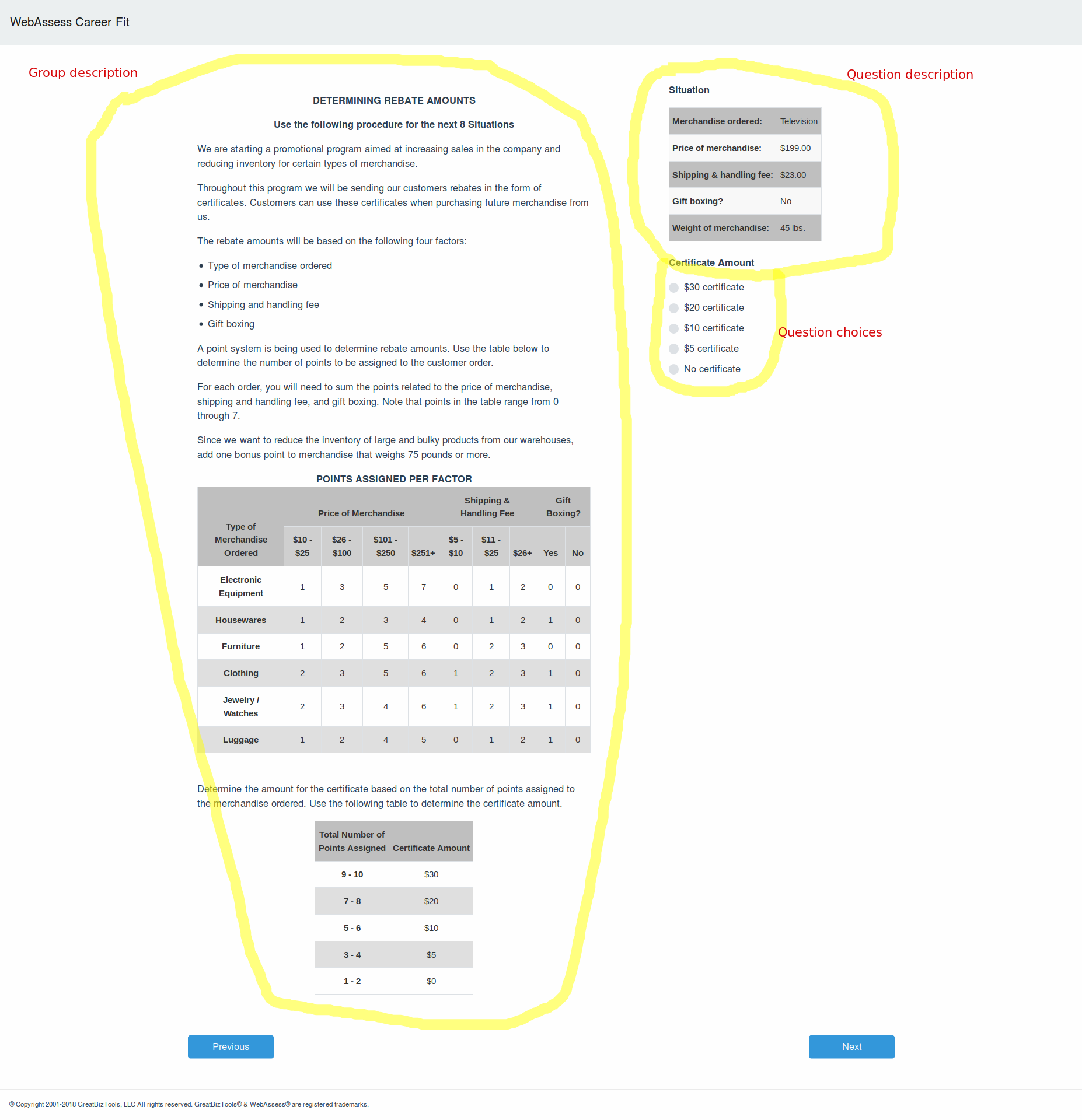
[ { "content": { "id": 161, "name": "Solving Problems P2", "description": "<p><center><strong> DETERMINING REBATE AMOUNTS<\/strong><\/p>\n<p><strong>Use the following procedure for the next 8 Situations<\/strong><\/center><\/p>\n<p>We are starting a promotional program aimed at increasing sales in the company and reducing inventory for certain types of merchandise.<\/p>\n<p>Throughout this program we will be sending our customers rebates in the form of certificates. Customers can use these certificates when purchasing future merchandise from us.<\/p>\n<p>The rebate amounts will be based on the following four factors:<\/p>\n<ul>\n<li>Type of merchandise ordered<\/li>\n<li>Price of merchandise<\/li>\n<li>Shipping and handling fee<\/li>\n<li>Gift boxing<\/li>\n<\/ul>\n<p>A point system is being used to determine rebate amounts. Use the table below to determine the number of points to be assigned to the customer order.<\/p>\n<p>For each order, you will need to sum the points related to the price of merchandise, shipping and handling fee, and gift boxing. Note that points in the table range from 0 through 7.<\/p>\n<p>Since we want to reduce the inventory of large and bulky products from our warehouses, add one bonus point to merchandise that weighs 75 pounds or more.<\/p>\n<p><center><strong>POINTS ASSIGNED PER FACTOR<\/strong><\/center>\n<center><style type=\"text\/css\">\n.tg {border-collapse:collapse;border-spacing:0;border-color:#ccc;}\n.tg td{font-family:Arial, sans-serif;font-size:14px;padding:10px 5px;border-style:solid;border-width:1px;overflow:hidden;word-break:normal;border-color:#ccc;color:#333;background-color:#fff;}\n.tg th{font-family:Arial, sans-serif;font-size:14px;font-weight:normal;padding:10px 5px;border-style:solid;border-width:1px;overflow:hidden;word-break:normal;border-color:#ccc;color:#333;background-color:#f0f0f0;}\n.tg .tg-baqh{font-weight:bold;background-color:#c0c0c0;border-color:#9b9b9b;text-align:center;vertical-align:bottom}\n.tg .tg-baqi{text-align:center;vertical-align:middle}\n.tg .tg-dzk6{background-color:#e0e0e0;border-color:#9b9b9b;font-weight:normal;border-color:#9b9b9b;text-align:center;vertical-align:bottom}\n.tg .tg-dzk7{background-color:#d0d0d0;border-color:#9b9b9b;font-weight:bold;text-align:center;vertical-align:bottom}\n@media screen and (max-width: 767px) {.tg {width: auto !important;}.tg col {width: auto !important;}.tg-wrap {overflow-x: auto;-webkit-overflow-scrolling: touch;}}<\/style>\n<div class=\"tg-wrap\"><table class=\"tg\">\n <tr><center>\n <td class=\"tg-baqh\" rowspan=\"2\"><strong>Type of<br>Merchandise<br>Ordered<\/strong><\/th>\n <td class=\"tg-baqh\" colspan=\"4\"><strong>Price of Merchandise<\/strong><\/th>\n <td class=\"tg-baqh\" colspan=\"3\"><strong>Shipping & <br>Handling Fee<\/strong><\/th>\n <td class=\"tg-baqh\" colspan=\"2\"><strong>Gift Boxing?<\/strong><\/th>\n <\/tr>\n <tr>\n <td class=\"tg-dzk7\">$10 - $25<\/td>\n <td class=\"tg-dzk7\">$26 - $100<\/td>\n <td class=\"tg-dzk7\">$101 - $250<\/td>\n <td class=\"tg-dzk7\">$251+<\/td>\n <td class=\"tg-dzk7\">$5 - $10<\/td>\n <td class=\"tg-dzk7\">$11 - $25<\/td>\n <td class=\"tg-dzk7\">$26+<\/td>\n <td class=\"tg-dzk7\"><br>Yes<\/td>\n <td class=\"tg-dzk7\"><br>No<\/td>\n <\/tr>\n <tr>\n <td class=\"tg-baqi\"><strong>Electronic Equipment<\/strong><\/td>\n <td class=\"tg-baqi\">1<\/td>\n <td class=\"tg-baqi\">3<\/td>\n <td class=\"tg-baqi\">5<\/td>\n <td class=\"tg-baqi\">7<\/td>\n <td class=\"tg-baqi\">0<\/td>\n <td class=\"tg-baqi\">1<\/td>\n <td class=\"tg-baqi\">2<\/td>\n <td class=\"tg-baqi\">0<\/td>\n <td class=\"tg-baqi\">0<\/td>\n <\/tr>\n <tr>\n <td class=\"tg-dzk6\"><strong>Housewares<\/strong><\/td>\n <td class=\"tg-dzk6\">1<\/td>\n <td class=\"tg-dzk6\">2<\/td>\n <td class=\"tg-dzk6\">3<\/td>\n <td class=\"tg-dzk6\">4<\/td>\n <td class=\"tg-dzk6\">0<\/td>\n <td class=\"tg-dzk6\">1<\/td>\n <td class=\"tg-dzk6\">2<\/td>\n <td class=\"tg-dzk6\">1<\/td>\n <td class=\"tg-dzk6\">0<\/td>\n <\/tr>\n <tr>\n <td class=\"tg-baqi\"><strong>Furniture<\/strong><\/td>\n <td class=\"tg-baqi\">1<\/td>\n <td class=\"tg-baqi\">2<\/td>\n <td class=\"tg-baqi\">5<\/td>\n <td class=\"tg-baqi\">6<\/td>\n <td class=\"tg-baqi\">0<\/td>\n <td class=\"tg-baqi\">2<\/td>\n <td class=\"tg-baqi\">3<\/td>\n <td class=\"tg-baqi\">0<\/td>\n <td class=\"tg-baqi\">0<\/td>\n <\/tr>\n <tr>\n <td class=\"tg-dzk6\"><strong>Clothing<\/strong><\/td>\n <td class=\"tg-dzk6\">2<\/td>\n <td class=\"tg-dzk6\">3<\/td>\n <td class=\"tg-dzk6\">5<\/td>\n <td class=\"tg-dzk6\">6<\/td>\n <td class=\"tg-dzk6\">1<\/td>\n <td class=\"tg-dzk6\">2<\/td>\n <td class=\"tg-dzk6\">3<\/td>\n <td class=\"tg-dzk6\">1<\/td>\n <td class=\"tg-dzk6\">0<\/td>\n <\/tr>\n <tr>\n <td class=\"tg-baqi\"><strong>Jewelry \/<br>Watches<\/strong><\/td>\n <td class=\"tg-baqi\">2<\/td>\n <td class=\"tg-baqi\">3<\/td>\n <td class=\"tg-baqi\">4<\/td>\n <td class=\"tg-baqi\">6<\/td>\n <td class=\"tg-baqi\">1<\/td>\n <td class=\"tg-baqi\">2<\/td>\n <td class=\"tg-baqi\">3<\/td>\n <td class=\"tg-baqi\">1<\/td>\n <td class=\"tg-baqi\">0<\/td>\n <\/tr>\n <tr>\n <td class=\"tg-dzk6\"><strong>Luggage<\/strong><\/td>\n <td class=\"tg-dzk6\">1<\/td>\n <td class=\"tg-dzk6\">2<\/td>\n <td class=\"tg-dzk6\">4<\/td>\n <td class=\"tg-dzk6\">5<\/td>\n <td class=\"tg-dzk6\">0<\/td>\n <td class=\"tg-dzk6\">1<\/td>\n <td class=\"tg-dzk6\">2<\/td>\n <td class=\"tg-dzk6\">1<\/td>\n <td class=\"tg-dzk6\">0<\/td>\n <\/center><\/tr>\n<\/center><\/table><\/div><\/center>\n<br>\n<br>\nDetermine the amount for the certificate based on the total number of points assigned to the merchandise ordered. Use the following table to determine the certificate amount.<\/p>\n<p><center><style type=\"text\/css\">\n.tg {border-collapse:collapse;border-spacing:0;border-color:#ccc;}\n.tg td{font-family:Arial, sans-serif;font-size:14px;padding:10px 5px;border-style:solid;border-width:1px;overflow:hidden;word-break:normal;border-color:#ccc;color:#333;background-color:#fff;}\n.tg th{font-family:Arial, sans-serif;font-size:14px;font-weight:normal;padding:10px 5px;border-style:solid;border-width:1px;overflow:hidden;word-break:normal;border-color:#ccc;color:#333;background-color:#f0f0f0;}\n.tg .tg-88nc{font-weight:bold;background-color:#e0e0e0;border-color:#9b9b9b;text-align:center;vertical-align:bottom}\n.tg .tg-88nb{font-weight:bold;background-color:#c0c0c0;border-color:#9b9b9b;text-align:center;vertical-align:bottom}\n.tg .tg-88nd{font-weight:bold;border-color:#ccc;text-align:center;vertical-align:center}\n.tg .tg-uys7{border-color:#ccc;text-align:center}\n.tg .tg-aj9k{font-weight:normal;background-color:#e0e0e0;border-color:#9b9b9b;text-align:center;vertical-align:bottom}\n@media screen and (max-width: 767px) {.tg {width: auto !important;}.tg col {width: auto !important;}.tg-wrap {overflow-x: auto;-webkit-overflow-scrolling: touch;}}<\/style>\n<div class=\"tg-wrap\"><table class=\"tg\">\n <tr>\n <td class=\"tg-88nb\">Total Number of<br>Points Assigned<\/th>\n <td class=\"tg-88nb\">Certificate Amount<\/th>\n <\/tr>\n <tr>\n <td class=\"tg-88nd\">9 - 10<\/td>\n <td class=\"tg-uys7\">$30<\/td>\n <\/tr>\n <tr>\n <td class=\"tg-88nc\">7 - 8<\/td>\n <td class=\"tg-aj9k\">$20<\/td>\n <\/tr>\n <tr>\n <td class=\"tg-88nd\">5 - 6<\/td>\n <td class=\"tg-uys7\">$10<\/td>\n <\/tr>\n <tr>\n <td class=\"tg-88nc\">3 - 4<\/td>\n <td class=\"tg-aj9k\">$5<\/td>\n <\/tr>\n <tr>\n <td class=\"tg-88nd\">1 - 2<\/td>\n <td class=\"tg-uys7\">$0<\/td>\n <\/tr>\n<\/center><\/table><\/div><\/p>", "questions": [ { "id": 112, "label": null, "description": "<p><strong>Situation<\/strong><\/p>\n<style type=\"text\/css\">\n.tg {border-collapse:collapse;border-spacing:0;border-color:#ccc;}\n.tg td{font-family:Arial, sans-serif;font-size:14px;padding:10px 5px;border-style:solid;border-width:0px;overflow:hidden;word-break:normal;border-color:#ccc;color:#333;background-color:#fff;}\n.tg th{font-family:Arial, sans-serif;font-size:14px;font-weight:normal;padding:10px 5px;border-style:solid;border-width:0px;overflow:hidden;word-break:normal;border-color:#ccc;color:#333;background-color:#f0f0f0;}\n.tg .tg-l711{font-weight:bold;background-color:#c0c0c0;border-color:#9b9b9b;text-align:left;vertical-align:bottom}\n.tg .tg-l712{font-weight:normal;background-color:#c0c0c0;border-color:#9b9b9b;text-align:left;vertical-align:bottom}\n.tg .tg-4646{background-color:#f9f9f9;border-color:#ccc}\n.tg .tg-4647{font-weight:bold;background-color:#f9f9f9;border-color:#ccc}\n@media screen and (max-width: 767px) {.tg {width: auto !important;}.tg col {width: auto !important;}.tg-wrap {overflow-x: auto;-webkit-overflow-scrolling: touch;}}<\/style>\n\n<div class=\"tg-wrap\"><table class=\"tg\">\n <tr>\n <td class=\"tg-l711\">Merchandise ordered:<\/th>\n <td class=\"tg-l712\">Television<\/th>\n <\/tr>\n <tr>\n <td class=\"tg-4647\">Price of merchandise:<\/td>\n <td class=\"tg-4646\">$199.00<\/td>\n <\/tr>\n <tr>\n <td class=\"tg-l711\">Shipping & handling fee:<\/td>\n <td class=\"tg-l712\">$23.00<\/td>\n <\/tr>\n <tr>\n <td class=\"tg-4647\">Gift boxing?<\/td>\n <td class=\"tg-4646\">No<\/td>\n <\/tr>\n <tr>\n <td class=\"tg-l711\">Weight of merchandise:<\/td>\n <td class=\"tg-l712\">45 lbs.<\/td>\n <\/tr>\n<\/table><\/div>\n\n<p><br>\n<strong>Certificate Amount<\/strong><\/p>", "response": null, "ordering": 0, "choices": [ "$30 certificate", "$20 certificate", "$10 certificate", "$5 certificate", "No certificate" ], "resourcetype": "MultipleChoiceQuestion" } ], "template": "<div class=\"container\">\r\n <div class=\"row\">\r\n <div v-if=\"description\" class=\"col-md-7\" v-html=\"description\">\r\n <\/div>\r\n <div v-if=\"description\" class=\"col-md-1 vertical-separator\">\r\n <\/div>\r\n <div :class=\"description ? ['col-md-4'] : 'col'\">\r\n <div class=\"row\" v-for=\"question in questions\">\r\n <div v-if=\"question.label\" class=\"col-12\" v-html=\"question.label\">\r\n <\/div>\r\n <div v-if=\"question.description\" class=\"col-12\">\r\n <p v-html=\"question.description\"><\/p>\r\n <\/div>\r\n <div class=\"col-12\">\r\n <fieldset>\r\n <div class=\"form-group\">\r\n <p v-if=\"question.variant1\">{{question.variant1}}<\/p>\r\n <p v-if=\"question.variant2\">{{question.variant2}}<\/p>\r\n <div class=\"custom-control custom-radio mb-2\" v-for=\"(choice, index) in question.choices\">\r\n <input :id=\"'choice-' + question.id + '-' + index\" class=\"custom-control-input\" type=\"radio\" :name=\"'radio-group-' + question.id\" v-model=\"question.response\" :value=\"choice\">\r\n <label class=\"custom-control-label\" :for=\"'choice-' + question.id + '-' + index\" v-html=\"choice\"><\/label>\r\n <!--label class=\"custom-control-label\" :for=\"'choice-' + question.id + '-' + index\">{{ choice }}<\/label-->\r\n <\/div>\r\n <\/div>\r\n <\/fieldset>\r\n <\/div>\r\n <\/div>\r\n <\/div>\r\n <\/div>\r\n<\/div>", "timeLimit": null, "elapsed": "889.111858", "allowPrev": true, "allowNext": true, "allowSkip": true, "test": { "id": 2911, "name": "Trial for testing templates [all non-Sample ItemBanks]", "timeLimit": null, "elapsed": "889.111913" } }, "next": 20537, "previous": 20535, "type": "group" } ]- Attributes (array)
Get results (for a specific assessment) [GET] assessments/{assessment_id}/results/
Users can only access their own results.
- Response 200 (application/json)
Attributes
- results (array)
- testName
- scorePct
- limitPct
- eligibleJobFaimlies (array [JobFamily])
- name (string)
- description (string)
- jobs (array [Job])
- name (string)
- description (string)
- averageSalary (object)
- high (number)
- low (number)
- currency (string)
- hasBrightOutlook (boolean)
- results (array)
Body ```json { “results”: [ { “testName”: “Test 1”, “scorePct”: 100, “limitPct”: 33.33333333333333 } ], “eligibleJobFamilies”: [ { “name”: “IT Jobs”, “description”: “Jobs for IT people”, “jobs”: [ { “name”: “Software engineed”, “description”: “Software engineers create software.”, “averageSalary”: { “high”: 150000, “low”: 1000000, “currency”: “USD” }, “hasBrightOutlook”: true } ] } ] }
``` ### Group Candidates
List Candidates [‘GET’] /candidates/
- Response (200)
- Attributes
- id
- name (string)
- picture (string) - url of the profile picture (NOTE: we don’t really have support for profile pictures…)
- location (string) - ??? (NOTE: No support for locations yet)
- favorite (boolean) - indivates whether candidate is a favorite of the requesting user
- currentProgress
- testBattery (string) - Name of the last test battery taken by the candidate
- progress - progress of the last assessment
- total (number) - total number of items in the assessment
- completed (number) - number of completed items in assessment
- started (Date) - start timestamp of the last assessment
- finished (Date) - timestamp showing when the last assessment was finished.
nullif not yet completed - recommended (boolean) - the candidate has been recommneded for at least a single job
- Attributes
Get single Candidate [‘GET’] /candidates/{id}/
TODO: simply return a different format here or use a format specifier (e.g. format=full)?
- Response (200)
- Attributes
- id
- name
- picture
- location
- favorite (boolean) - indivates whether candidate is a favorite of the requesting user
- hired (boolean) - whether this candidate has been hired (this is a r/o property). This property is redundant and is here mainly for convenience as its value can be deducted from the
positionproperty. - position - current position (last hiring decision made). May be null if no hiring decision was made for this candidate yet. If the candidate’s hiring decision is changed to ‘no hire’ from an earlier ‘hire’ then both
jobandcustom_namewill be null. Otherwise one of these will contain the position/job candidate is hired for.- job (Job) - job candidate was hired for. May be null (see above)
- customName (string) - custom name of position (if
jobis not applicable) - created (Date) - timestamp of hiring decision
- profile
- assessments (array [Assessment])
- testBattery
- name
- url/id - ??? url would be more RESTful, but ID helps with local navgation (maybe both?)
- started (Date)
- finished (Date)
- recommended (boolean) - the candidate has been recommneded for at least a single job
- testBattery
- competencies (array) - aggregated competency profile (testResults ?)
- testName
- scorePct
- limitPct
- eligibleJobs (array) - (alternative names to consider: jobFits)
- job (Job)
- name (string)
- results -> TODO: lookup name(s) from code & templates (radar chart data) // maybe just link to actual results? (But we’ll have to run the evaluation anyway…)
- testName (string) - name of the test
- testLabel (string) - short label for the test
- requirement (number) - required minimun score (percentage)
- score (number) - actual score (percentage)
- job (Job)
- assessments (array [Assessment])
- Attributes
Update candidate / set favorite status [‘PUT’, ‘PATCH’] /candidates/{id}/
The resource supports partial updates.
- Attributes
- favorite (boolean) - indivates whether candidate is a favorite of the requesting user
Update position (hiring decision) [‘POST’] /candidates/{id}/position/
Create (update) hiring decision for candidate. Technically hiring decisions are immutable, we keep a history, so you can only create a new one and not change existing ones. The valid one is always the last decision. When creating a hiring decision provide only one of jobId or customName. To indicate a no hire provide none (e.g. by posting an empty object).
- Attributes
- jobId - id of the job to hire candidate for
- customName - custon name of position/job to hire candidate for
- Response (201) - operation successful
Group Assessments
This section only describes the endpoints in use by the client admin in this group, but there are some others in use by the test-taking app. Those are not documented yet.
List Assessments [‘GET’] /assessments/
Returns the list of assessments the current user has access to. (I.e. ones that belong to candidates that they have permission to view.)
- Response (200)
- Attributes
- id
- email (string)
- name (string)
- location (string) - Location name (location of the candidate that this assignment belongs to)
- testBattery (TestBattery)
- id (number)
- name (string)
- currentProgress
- testBattery (string) - Name of the last test battery taken by the candidate
- progress - progress of the last assessment
- total (number) - total number of items in the assessment
- completed (number) - number of completed items in assessment
- started (Date) - start timestamp of the last assessment
- finished (Date) - timestamp showing when the last assessment was finished.
nullif not yet completed
- Attributes
Group Assessment reporting (results)
List assessments with results if available [‘GET’] /reports/assessments/
- Response (200)
- Attributes
- id (number)
- user
- email (String)
- firstName (String)
- lastName (String)
- invitation
- key (String)
- id (number)
- testBattery (array [TestBattey])
- id (number)
- name (string)
- started (Date) - timestamp when assessment was started
- finished (Date, nullable) - timestamp when assessment was finished (if finished)
- results
- type (String) - “jobs” or “capabilities”
- capabilities (Array[Capability], optional) - present if type is “capabilities”
- id (number) - capability id
- name (String)
- level - capability level achieved
- id - id of level achieved (note that this is unique, so e.g. a “middle level” will have a different id depending on the capability it belongs to)
- name (String) - name of level achieved
- jobs (Array[JobMatch], optional) - present if type is “jobs”
- job (Job) - A Job tested for by the assessment
- id (Number)
- name (String)
- match (Boolean) - shows whether the candidate/user was matched to this specific job or not
- job (Job) - A Job tested for by the assessment
- Attributes
Get the results for a specific assessment [‘GET’] reports/assessments/{id}/
See response above.
Group Jobs
Get List of Jobs [‘GET’] /jobs/
- Response (200)
- Attributes
- id (number)
- name (string)
- description (string)
- jobFamily (JobFamily)
- id (number)
- name (string)
- averageSalary (object)
- high (number)
- low (number)
- currency (string)
- hasBrightOutlook (boolean)
- Attributes
Get single Job [‘GET’] /jobs/{id}/
- Response (200)
- Attributes
- id (number)
- name (string)
- description (string)
- averageSalary (object)
- high (number)
- low (number)
- currency (string)
- hasBrightOutlook (boolean)
- badge (Badge)
- testBatteries (array [TestBattey])
- id (number)
- name (string)
- competencies (array [Competency])
- id (number)
- name (string)
- description (string)
- Attributes
Group TestBatteries
List TestBatteries [‘GET’] /batteries/
- Response (200)
- Attributes
- id (number)
- name (string)
- jobs (array) - list of jobs assigned to this battery (may be removed if not needed on the list page)
- id (number)
- name (string)
- Attributes
Get a single TestBattery [‘GET’]
- Response (200)
- Attributes
- id (number)
- name (string)
- jobs (array) - list of jobs assigned to/evaluated by this battery
- id (number)
- name (string)
- competencies (array) - list of competencies tested for by this batter
- id (number)
- name (string)
- Attributes
Group Invitations
Create Invitation [‘POST’] /invitations/
Create an invitation and optionally send an invite email.
- Attributes
- email (string) - email address of the user to invite
- admin (string) - email address of the admin user
- battery (number) - ID of the test battery
- location (string) - code of the location to assign the user to (if they are a new user, otherwise ignored)
- sendEmail (boolean) - whether MyInnerGenius should send out the invitation email or not. (Defaults to not sending the email)
- first_name (string) - first name of the user
- last_name (string) - last name of the user
- expires (string, iso timestamp) - expiration date and time for the invitation (defaults to two weeks from creation)
- Response (201)
- Attributes
- url (string) - invitation link
- Attributes
List invitations [‘GET’]
- Response (200)
- Attributes
- email (string) - email address of the user to invite
- admin (string) - email address of the admin user
- battery (number) - ID of the test battery
- location (string) - code of the location to assign the user to (if they are a new user, otherwise ignored)
- first_name (string) - first name of the user
- last_name (string) - last name of the user
- created ((string, iso timestamp) - creation timestamp
- expires (string, iso timestamp) - expiration date and time for the invitation (defaults to two weeks from creation)
- assessment (number) - assessment ID (after the invitation has been accepted, null otherwise)
- url (string) - invitation link
- key (string) - invitation key, the unique part of the invitation url
- Attributes
Create (send) Invitaions in bulk [‘POST’] /batteries/{id}/invitations/
Send out email invitations for the specified battery.
- Attributes
- emails (Array[string]) - optional, list of email addresses to send invitations to
- location (number) - location id to use in the invites
- file - XLS or CSV file containing the email addresses in the first column, one per line formatted as a base64 encoded data url (e.g.
data:text/csv;base64,aGVsbG9Ad29yLmxk)
You can provide any or both of emails or file.
Accepted MIME types and the respective file formats: + application/vnd.openxmlformats-officedocument.spreadsheetml.sheet - XLSX + application/vnd.ms-excel - XLS + text/csv - CSV
Group data export / spreadsheet download
These endpoints allow donwloading specific datasets belonging to some of the above endpoint in a spreadsheet format (either CSV or XLSX). The format is specified via the Accept header, the default being CSV. These endpoints are separate from the JSON endpoints for two reasons: * the logical structure is different as JSON is hierarchical and the spreadsheets are flat * some of the logic behind the spreadsheet endpoints is also used for data export in the admin. While this is an implementation detail, doing it this way prevents code duplication that would arise if we wanted to flatten the original output format of the above endpoints
Export assessments (‘report’ functionality) [‘GET’] ‘/export/assessments/’
The filtering and ordering options are the same as with the /candidates/ endpoint. The page_size parameter is ignored. The file name to use for saving the file is returned in the Content-Disposition header. The returned spreadsheet format can be selected with the Accept request header. As of now two formats are supported: CSV (text/csv) and XSLX (application/vnd.openxmlformats-officedocument.spreadsheetml.sheet).
Group Locations
A Location belongs to a Company and Candidates are always assigned to one. Admin users are also organized by locations and, depending on their permission level, they may be able to see the candidates assigned to one or more locations (besides their own, invited candidates).
List locations [‘GET’] /location/
Only admin users with the right set of privileges can do this. Missing priviliges will lead to a 403 error (or an empty result list).
- Response (200)
- Attributes
- id (number)
- name (string) - location name
- code (string) - code name
- company (Company) - company this location belongs to
- id (number)
- name (string)
- address (Address, optional) - physical address of the location
- id (number)
- country
- code (string) - ISO 3166-alpha-2 code of the country
- name (string) - human readable (Englisg) name of the country
- state (string, optional) - state (if applicable)
- locality (string) - city or similar
- address_line (string) - street address
- address_line_2 (string, optional)
- phone_number (string, optional) - phone number belonging to the location
- timezone (string) - time zone name
- Attributes
Create location [‘POST’] /locations/
- Attributes
- name (string) - location name
- code (string) - code name
- address (Address, optional) - physical address of the location
- id (number)
- country
- code (string) - ISO 3166-alpha-2 code of the country
- name (string) - human readable (Englisg) name of the country
- state (string, optional) - state (if applicable)
- locality (string) - city or similar
- address_line (string) - street address
- address_line_2 (string, optional)
- phone_number (string, optional) - phone number belonging to the location
- timezone (string) - time zone name
Get individual location [’GET] /locations/{id}/
See response format above
Update location [‘PUT’, ‘PATCH’] /locations/{id}/
Data Structures
Group (object)
- id (number) - id of the group
- name (string) - name of the group
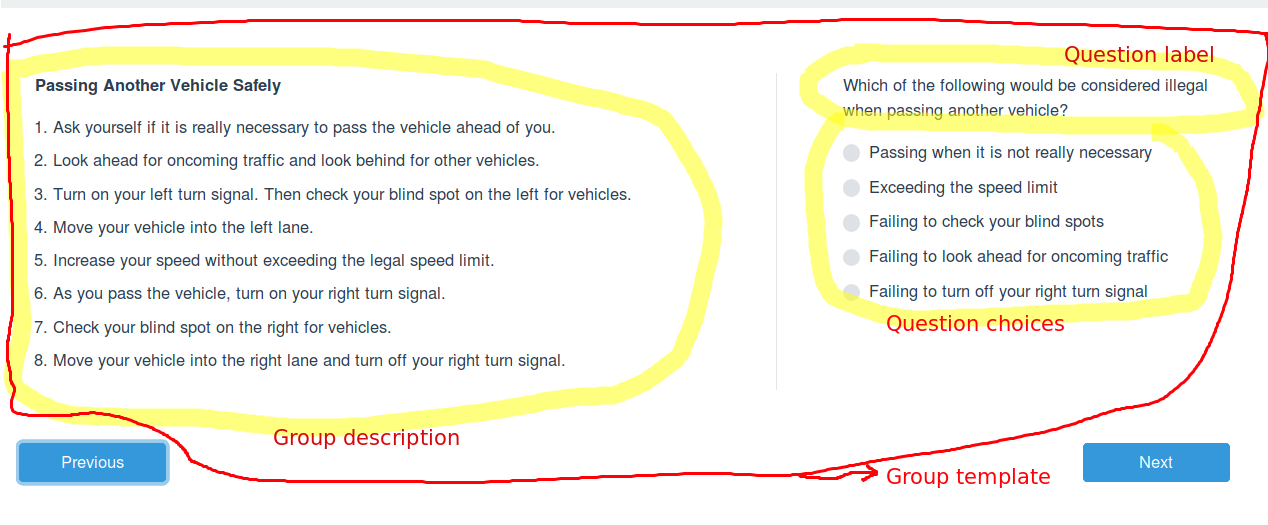
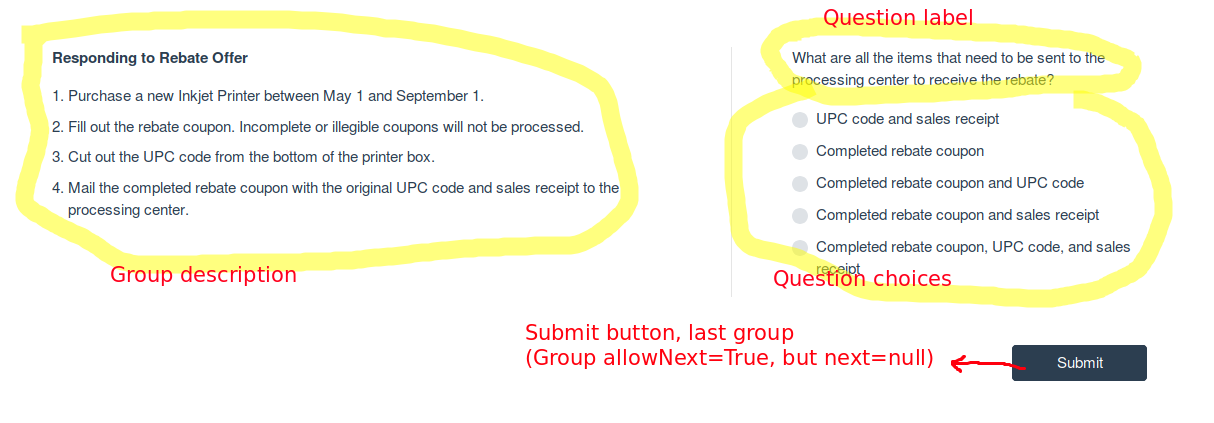
- description (string) - group description. This is information common to all questions belongig to this group. This should be displayed. See explanatory screenshot(s).
- template (string) - a VueJS/html template to render the group on the client. The template will receive (and reference) the data found in the current group object. (I.e. this object.)
- questions (array) - a list of questions belongig to this group. (See structure of Question below.)
- timeLimit (number) - number of seconds allowed to take this group (to answer all the questions in this group), if any.
- elapsed (number) - number of seconds elapsed since the initial presentation of this group. (To be exact, the initial presentation by the server.)
- allowPrev (boolean) - whether the user should be able to (manually) move to the previous group. (I.e. e.g. whether to show a ‘Previous’ button or not.)
- allowNext (boolean) - whether the user should be able to (manually) move to the next group.
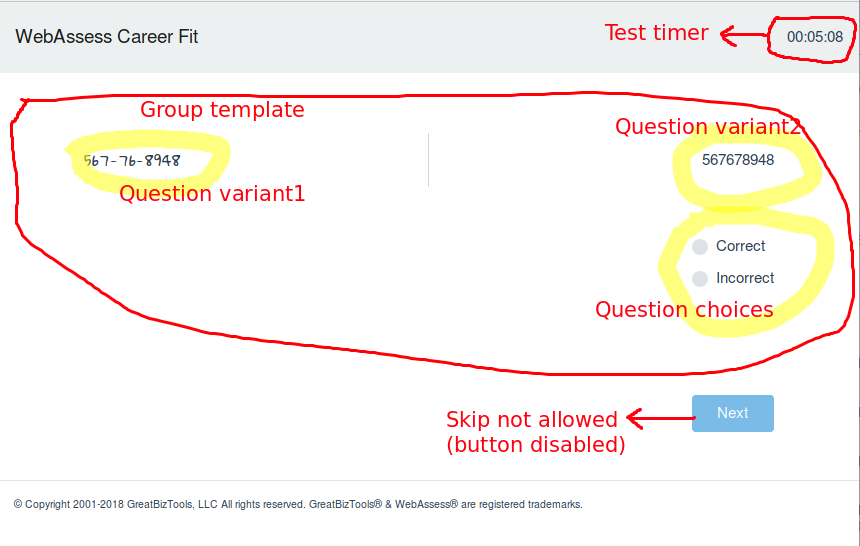
- allowSkip (boolean) - whether the user is allowed to skip (questions in) the current group. I.e. whether it is allowed to submit a null/empty response to any of the included questions.
- test (object) - Information about the test this group (and the questions) belong to.
- id (number) - id of the test
- name (string) - name of the test (can be displayed for informational purposes if needed)
- timeLimit (number, nullable) - number of seconds allowed for this test, if any
- elapsed (number) - number of seconds elapsed since the start of this test (may be present even if the test doesn’t have a time limit). The start of the test means the initial presentation of the first group, as observed by the server.
Question (object)
- id (number)
- label(string, nullable) - label for the question (html). To be displayed for the user.
- description (string, nullable) - description for the question. To be displayed for the user.
- ordering (number) - This is used for ordering the questions. The questions already come ordered from the API.
- response (string, nullable) - the last (current) response submitted by the user for this question.
- choices (array[string]) - the response choices. These are both to be used to be displayed for the user as well as for submitting responses.
- resourcetype (enum[string]) - Type of the question.
- Members:
- MultipleChoiceQuestion
- ComparisonQuestion
- Members:
ComparisonQuestion
This type has the following extra fields:
- variant1 (text) - Variant to compare with the other one
- variant2 (text) - Variant to compare with the other one
Page
- content (string) - html (potentially a VueJS template)
Badge (object)
- id (number)
- name (string)
Screenshots
Sample screenshots from the current web app to help visualizing how data from the API should (can) be rendered and what each of them mean.
Potential problems with non-web clients
As you can see from the API, the groups and questions carry their own layout as a VueJS template. This template will control both the layout and some of the content (it may have additional text not present in the data fields). An ideal mobile client would be able to render these templates. To provide a native L&F, we’d have to serve vue-native (or react native) templates, though. (Vue-native can be compiled to react native.) To do so, we’d also have to use these for the web app (e.g. through vue-native -> react-native -> react-native-web) or we’d have to have and serve different templates for different clients (which do make a lot of sense).
However, these are out of scope for now, so the mobile client will have to provide its own rendering code. The problem you’ll face here is that due to the above design decision (each group having their own template), the same question type (see Question.resourcetype) can have a different look/layout.
E.g. all the above screenshots contain multiple choice questions, but they do come in different layouts. The API doesn’t provide a way to differentiate between the preferred layouts. What you can do for now is trying to guess based on the other parameters (e.g. group has description or not, number of choinces and maybe the test id).